How Open LMS Ensured Data Security for Its Clients During a Global Cyberattack
In early August 2025, Open LMS staff became aware of a systematic credential stuffing campaign against a select few of our hosted sites. While investigating the cause of this cyberattack, it became clear that this was an automated, planned campaign targeting MoodleTM sites worldwide. The attack targeted a select few Open LMS sites and thousands of other Moodle™-based sites hosted by different providers.
Open LMS identified the source of the usernames and passwords used in these operations as those leaked several years ago. The leaked data was readily available in newly aggregated datasets. The new aggregation sets made it quite simple for the cyberattackers to load accounts and passwords into botnet automation to try to breach sites. Botnet automation works by infecting multiple devices—such as computers and smartphones—with malicious software that allows a hacker to remotely control them.
READ A RELATED BLOG POST | ‘Responding to the Recent AWS Outage: How Open LMS Ensured Service Resilience’

It seemed as though the data mining had led to matching accounts to MoodleTM sites, and some of the targets were hosted within Open LMS hosting environments. In most cases, the compromised accounts were no longer active; in others, they were active but had no current courses and no privileges that would make them useful.
As the Open LMS support team worked with the targeted clients, we discussed the issue with other Moodle™-hosting businesses. One Moodle™ partner had previously developed a checker tool and shared the plugin with Open LMS. After testing the tool, we created our own copy of it and modified some of the plugin’s behaviors. Through meticulous collaboration with our clients and other Moodle™-based vendors, we identified that the cyberattack was indeed a global campaign.
The Password Leak Check plugin checks for the presence of known passwords in the HaveIBeenPwned breached-password database, an industry-standard tool for aggregating and tracking breaches. The plugin checks a partial match of the password hash used to log in against the HaveIBeenPwned breached passwords API and takes action when a match is found in any of the cataloged breaches. The API only receives a partial hash so that if HaveIBeenPwned were ever compromised, good password hashes would not be leaked.
Once a leaked password has been detected, the plugin can either force the user to immediately change the password during login—which is not recommended, as this could be the attacker—or it can immediately lock the user out by:
- Blanking the password stored in the database
- Destroying all existing sessions for the user on any device/browser
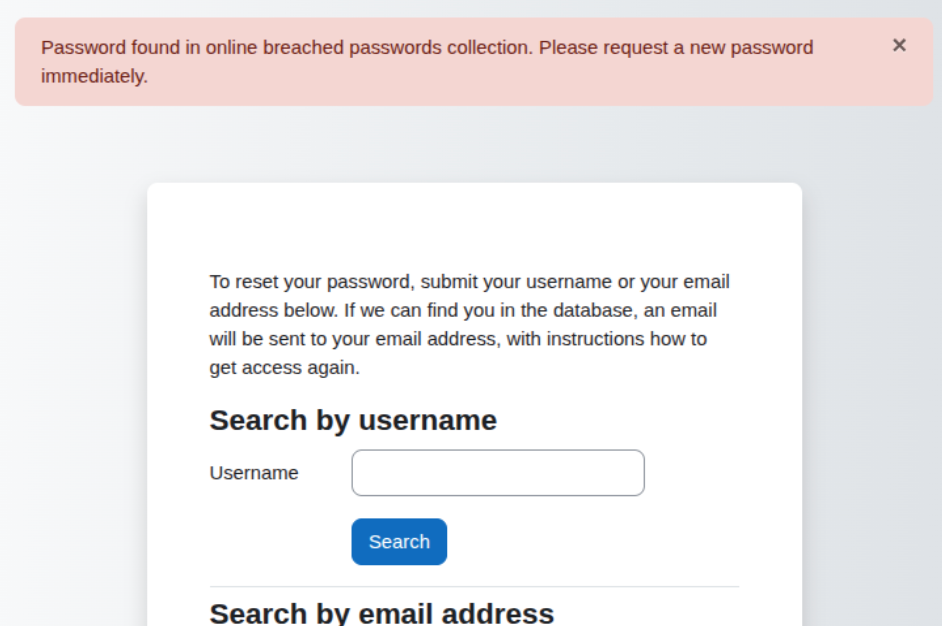
- Redirecting the user to the “forgot password” page with a message dialogue shown at the top of the page

MORE FROM THE BLOG | ‘Seamless Integrations, Seamless Transition: How Open LMS Works With Your Existing Tech Stack’
This method forces the site to generate a new temporary password and email it to the address we have for the user. When the user attempts to log in, they’re made to provide a new password.
Password Leak Check validates passwords of accounts that utilize internal (manual) authentication. For sites utilizing LDAP, SAML, OAuth, or other external identity services, your Open LMS site never receives the password, ensuring it remains secure from remote login attacks.
Through these security measures and collaboration with other Moodle™-based providers, Open LMS was able to swiftly mitigate the cyberattack, inform clients of the issue, and keep their information protected.
FAQs
Does this password problem mean my or someone else’s Open LMS data was breached? Have our passwords been leaked?
No. The key to this problem and the overall usefulness of these breached passwords is how people as software users are predisposed to use the same account information on multiple sites. Once one site leaks the user’s information, all sites that use that same combination of username and password are now exposed.
What else should I do as an Open LMS or Moodle™-based learning platform user?
Change your passwords regularly, avoid reusing the same password information on multiple sites, and delete old accounts when they are not needed anymore.
What else should I do as an LMS site administrator?
Check your password policies on the site and consider bringing them up to date if they have been in place for a long time. Site password policies apply to internal authentication, so users coming in from outside identity services like LDAP and SAML are managed over there. These policies are primarily found in the Site admin settings under Security > Site security policies. Here you can set up and manage password strength settings (length and complexity) and password lockout settings to lock out based on failed attempts to log in. Under the Site admin settings heading Plugins > Authentication > Manual Accounts, you can also set up a duration for expiring passwords to force a password change on a regular basis.
For more information about the password checker plugin and its functionality, read this article from the Open LMS Knowledge Base.
HANDPICKED FOR YOU | ‘Our Year in Review: How Open LMS Supported a Fantastic 2025 for the L&D Community’
Open LMS is ready to support your security needs! Take a quick tour of our learning platform or request a demo to learn more.